You wouldn’t use a hammer to fix a leaky faucet. The right tool makes any job easier, and the same is true for your business. Your payment terminal is a critical tool, and the one that’s perfect for a bustling coffee shop might be all wrong for a mobile dog groomer. The key is to match the hardware to your unique workflow, sales volume, and customer environment. Instead of searching for a one-size-fits-all solution, you need to identify your specific needs first. This guide will help you do just that. We’ll explore the different types of terminals and what makes them suitable for retail, restaurants, or service professionals, helping you find the best contactless payment terminal for small business by focusing on the right fit for you.
Key Takeaways
- Calculate the Total Cost of Ownership: The price of the terminal is just the start. To find the best deal, factor in the hardware cost, per-transaction rates, and any monthly fees to understand what you’ll actually pay and protect your profit margins.
- Choose a Terminal That Fits Your Business: The best device is one that solves your unique challenges. Consider your daily operations—whether you need portability for on-the-go sales, durability for a fast-paced restaurant, or deep integration for a retail store—to find the perfect fit.
- Improve the Customer Experience with Speed and Security: Contactless payments are faster and more secure than traditional methods. By offering a quick, tap-to-pay option, you meet modern customer expectations, protect their data with advanced encryption, and create a smooth checkout that encourages them to return.
What to Look for in a Contactless Payment Terminal
Choosing the right payment terminal is about more than just accepting cards; it’s about creating a smooth, secure, and professional checkout experience for your customers. As you compare options, think about how a new terminal will fit into your daily workflow. The best device for your business will check all the right boxes, from speed and security to how well it plays with the other tools you already use. Let’s walk through the key features you should have on your checklist.
Speed and Reliability
Nothing slows down a busy day like a lagging payment terminal. When you have a line of customers, every second counts. A reliable terminal processes transactions in a flash, keeping your checkout line moving and your customers happy. Look for a device known for its quick processing power. Modern contactless payments can be significantly faster than other methods, which is a huge win for any business with a rush hour. A fast, dependable terminal means less waiting for everyone and a smoother overall experience that reflects well on your business.
Top-Notch Security and Compliance
As a business owner, protecting your customers’ data is one of your most important responsibilities. A secure terminal is non-negotiable. Your device must be PCI compliant and equipped with modern security features like encryption and tokenization. These technologies work together to fortify payment information, scrambling sensitive card data into a secure code that’s useless to fraudsters. This not only protects your customers but also safeguards your business from the financial and reputational damage of a data breach. Always confirm that a terminal meets the latest security standards before you make a decision.
Seamless POS Integration
Your payment terminal shouldn’t be a standalone gadget; it should be a fully integrated part of your point-of-sale (POS) system. The right terminal will sync effortlessly with your existing setup, automatically recording sales, updating inventory, and managing customer data. This saves you from hours of manual data entry and reduces the risk of human error. Many modern credit card machines can also connect with your accounting software, like QuickBooks, and even let you customize receipts with your business logo, creating a more cohesive and professional brand experience.
Ease of Use and Portability
The best technology is the kind you don’t have to think about. Your terminal should be intuitive for both your staff and your customers. Look for a device with a clear interface, a responsive touchscreen, and a design that’s easy to handle. Portability is another key factor, especially if you run a restaurant, operate a mobile business, or attend markets. A lightweight, portable credit card machine gives you the freedom to take payments anywhere—at the table, on the sales floor, or at a pop-up event—ensuring you never miss a sale.
Acceptance of All Payment Types
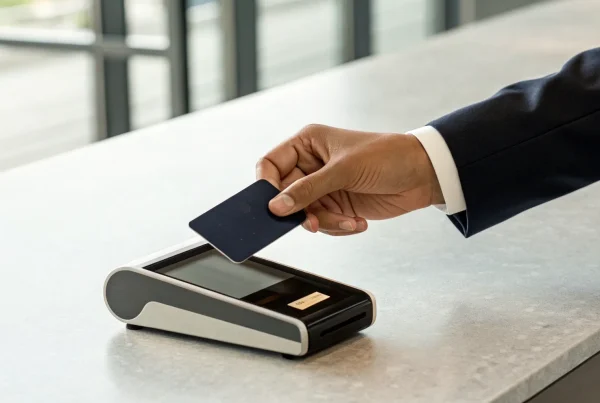
Today’s customers expect to pay however they want, whether that’s with a traditional credit card, a digital wallet, or a smartwatch. Your terminal needs to be ready for all of it. Ensure the device you choose accepts all major payment types, including EMV chip cards, magnetic stripe cards, and NFC contactless payments like Apple Pay and Google Pay. This flexibility shows your customers that you’re up-to-date and value their convenience. It allows them to pay by tapping their preferred device without needing to dig for a physical card, making the entire transaction quick and effortless.
A Quick Look at Top Contactless Terminals
MBNCard Payment Solutions
If you’re looking for a partner that truly gets the needs of a small business, MBNCard is a great place to start. We offer a range of payment solutions designed to be straightforward and reliable, so you can stop worrying about your tech and focus on your customers. Our terminals are built for easy integration with the systems you already use, making the switch to contactless payments feel less like a chore and more like a simple upgrade. We prioritize clear pricing and dedicated support, ensuring you have everything you need to accept payments securely and efficiently without any headaches. It’s a practical choice for any business owner who values simplicity and a supportive partnership.
Square Reader for Contactless and Chip
The Square Reader is a familiar sight for a reason—it’s incredibly versatile and portable. This little device is perfect for businesses that don’t stay in one place, like food trucks, market stalls, or service professionals who visit clients. It accepts tap-to-pay, chip cards, and mobile wallets like Apple Pay and Google Pay, all in one compact package. With a battery that’s built to last through a busy day, you can process payments anywhere you have a connection. It pairs seamlessly with Square’s point-of-sale app, turning your phone or tablet into a complete checkout system. For business owners on the move, it’s a reliable and convenient tool.
Clover Flex
Think of the Clover Flex as more than just a payment terminal; it’s a handheld business command center. This device is ideal for dynamic environments like restaurants or retail stores where you need to take payments away from the main counter. You can accept contactless payments, manage your inventory, view sales reports, and even capture customer signatures right on the screen. Its all-in-one design means you don’t have to juggle multiple devices to run your business. If you’re looking for a flexible system that can handle payments and help you manage operations from anywhere in your store, the Clover Flex is a powerful contender.
PayPal Zettle
For businesses already comfortable within the PayPal ecosystem, the PayPal Zettle reader is a natural fit. It’s designed to be simple, with a focus on getting you up and running quickly. The reader connects to your smartphone or tablet and allows you to accept contactless and chip card payments with ease. One of its biggest draws is the seamless integration with your PayPal Business account—your funds typically appear quickly, which is a huge plus for managing cash flow. With competitive, straightforward transaction fees, it’s a solid and convenient choice for small businesses that want a reliable reader backed by a trusted name in online payments.
SumUp Air
If you’re looking for an affordable and incredibly user-friendly option, the SumUp Air is worth a look. This compact reader is perfect for entrepreneurs, freelancers, and small vendors who need a simple way to accept contactless and card payments without a hefty upfront investment. It’s small enough to fit in your pocket and connects via Bluetooth to your smartphone or tablet. There are no monthly fees—you just pay a flat rate per transaction, which makes it easy to predict your costs. The setup is quick and painless, making it one of the most accessible entry points into contactless payments for new or mobile businesses.
Shopify POS Go
For merchants who run their business on Shopify, the Shopify POS Go is the ultimate tool for unifying online and in-person sales. This all-in-one device functions as a POS terminal, barcode scanner, and card reader, allowing you to manage your entire business from the palm of your hand. Because it integrates directly with your Shopify store, your inventory, sales, and customer data are always in sync, whether a customer buys online or at your pop-up shop. It helps create a smooth checkout experience for your customers and simplifies your back-end operations. If you’re already part of the Shopify family, this device is a game-changer for selling anywhere.
What’s the Real Cost of a Contactless Terminal?
When you’re looking at a new contactless terminal, the price tag on the hardware is just the beginning of the story. The true cost is a mix of the initial purchase, the fees you pay on every sale, and any monthly charges that come with the service. It’s easy to get drawn in by a low upfront price, but the per-transaction rates and hidden fees are where the real expenses can hide. Understanding these three key areas will help you see the complete financial picture and make a choice that’s right for your business.
Think of it like buying a car—you don’t just look at the sticker price. You consider the cost of gas, insurance, and maintenance to understand the total cost of ownership. It’s the same with a payment terminal. You need to look beyond the hardware and consider the transaction fees and any monthly service costs. Breaking down these expenses helps you compare your options accurately and choose a solution that truly fits your budget, not just one that looks good on the surface. This way, you can avoid surprises on your monthly statement and find a partner that supports your business’s growth without chipping away at your profits.
Upfront Hardware Costs vs. Payment Plans
The first cost you’ll encounter is the hardware itself. A standalone smart terminal can run anywhere from $200 to $800. For example, a popular option like the Square Terminal costs about $299 if you buy it outright. However, many providers offer payment plans to make the initial investment more manageable. That same Square terminal could be broken down into monthly payments of around $27 for a year. This flexibility is a huge help for small businesses that need to manage their cash flow carefully. Deciding whether to pay upfront or over time depends entirely on your current budget and financial strategy.
Per-Transaction Fees and Rates
After the hardware, the most significant ongoing cost is the per-transaction fee. Every time a customer taps their card or phone, your payment processor takes a small cut. Most flat-rate processors charge around 2.6% + $0.10 to $0.15 for each transaction. While these small percentages might not seem like much, they add up quickly, especially as your sales volume grows. It’s worth shopping around, as some providers offer more competitive rates. For instance, PayPal Zettle comes in slightly lower at 2.29% + $0.09. Understanding these rates is critical to forecasting your monthly expenses and protecting your profit margins.
Monthly Charges and Hidden Fees
Beyond transaction fees, be on the lookout for monthly charges or other hidden costs. Some processors bundle everything into one simple rate, while others have separate fees for things like PCI compliance, statement fees, or gateway access. It’s incredibly important to read the fine print in your merchant agreement before signing. Many providers, including us at MBNCard, pride ourselves on transparent pricing with no hidden fees, but that isn’t the industry standard. Always ask for a complete fee schedule so you know exactly what you’re paying for each month and can avoid any unwelcome surprises on your statement.
How to Calculate Your Total Cost
To get a clear picture of what you’ll actually pay, you need to do a little math. Start with the hardware cost (whether it’s a one-time purchase or a monthly payment). Then, estimate your monthly sales volume and multiply it by the transaction rate to figure out your processing fees. Finally, add any fixed monthly service charges. This calculation will give you a realistic total monthly cost. Also, consider how well the system works with your accounting software, as seamless integration can save you hours of manual work and reduce administrative headaches down the line.
Find the Right Terminal for Your Business
Choosing a payment terminal isn’t a one-size-fits-all decision. The device that works perfectly for a bustling coffee shop might be overkill for a freelance designer. The key is to match the hardware to your specific business needs, your daily workflow, and the experience you want to give your customers. Think about your environment: Are you dealing with long lines, messy hands, or constant movement? Let’s break down some of the top contenders based on what you do every day.
Best for Retail and Brick-and-Mortar Shops
If you run a retail store, you know the checkout counter can become a bottleneck. You need a terminal that’s fast, reliable, and can handle a steady stream of customers without a hiccup. For this kind of environment, the Clover Compact is an excellent choice. It’s known for being durable and incredibly easy for your team to learn and use. With a built-in printer and PIN pad, it’s an all-in-one solution that keeps your counter tidy and your lines moving. This makes it one of the best credit card readers for busy retail shops that prioritize efficiency.
Best for Restaurants and Food Service
Restaurants, cafes, and bars are controlled chaos. Spills, drops, and constant motion are just part of the job. You need a terminal that’s tough enough to survive the dinner rush. The Toast Go is designed specifically for this world. It’s spill-proof and drop-proof, so you don’t have to panic when a server bumps into a table. More importantly, it integrates directly with Toast’s restaurant management system. This allows your staff to take orders, send them to the kitchen, and process payments right at the table, which improves accuracy and speeds up table turnover.
Best for Service-Based Professionals
Whether you’re a hairstylist, a consultant, or a contractor, you need a payment solution that’s as professional and flexible as you are. The Square Terminal is a fantastic, user-friendly option. It’s affordable and features a built-in printer, so you can offer clients a physical receipt on the spot. The terminal also works smoothly with other Square tools, making it a versatile option for managing appointments, invoices, and payments all in one place. It’s a sleek, simple device that gives your service-based business a polished, professional edge.
Best for Mobile Vendors and Pop-Ups
For businesses on the move—like food trucks, market stalls, or pop-up shops—portability is everything. You need a device that’s lightweight, powerful, and works anywhere. The Square Handheld is the perfect smart terminal for these dynamic settings. Its standout feature is a built-in barcode scanner, which is a game-changer for quickly ringing up items when you don’t have a traditional counter. This allows you to manage inventory and process sales efficiently, so you can focus on making connections with customers, wherever your business takes you.
Common Myths About Contactless Terminals, Busted
Adopting new technology can feel like a big step, especially when you’re hearing mixed messages. It’s easy to get caught up in the “what ifs” and decide to just stick with what you know. But when it comes to contactless payments, many of the common worries are based on outdated ideas. Let’s clear the air and look at the facts behind the biggest myths. You might be surprised to find that accepting tap-to-pay is more secure, affordable, and straightforward than you think. Getting the right information is the first step toward making a smart decision for your business and your customers.
Myth: “Contactless is less secure.”
This is probably the most common concern I hear, and it’s completely understandable. The idea of a transaction happening with a simple tap can feel a bit like magic—and maybe not the good kind. But here’s the reality: contactless payments are incredibly secure. Each transaction uses advanced encryption and tokenization to protect payment information. Tokenization replaces sensitive card data with a unique, one-time-use code. So, even in the highly unlikely event that a fraudster intercepted the signal, the data they’d capture would be completely useless. It’s a powerful security feature that protects both you and your customers from fraud.
Myth: “It’s too expensive for a small business.”
When you’re running a small business, every dollar counts. The thought of investing in new hardware can be intimidating, but the idea that contactless terminals are out of reach is a total myth. The market is full of affordable payment solutions designed specifically for businesses like yours. Many providers offer competitive pricing on hardware, sometimes even including it as part of a processing package. Instead of seeing it as an expense, think of it as an investment in your customer experience and operational speed. Faster checkouts lead to happier customers and can even help you serve more people during peak hours.
Myth: “My customers don’t use it.”
You might think your specific customer base prefers the old-school swipe or chip, but the data tells a different story. Contactless payment adoption has soared across all age groups. People love the convenience and speed—a quick tap is much faster than inserting a chip and waiting for it to process. In fact, customers are now starting to expect this option wherever they shop. Not offering tap-to-pay can make your checkout process feel dated and slow, which isn’t the impression you want to leave. Providing the payment methods customers prefer is a simple way to show you value their time and are keeping up with their expectations.
Myth: “The setup is too complicated.”
No one wants to spend hours wrestling with new tech, especially when you have a business to run. Thankfully, the days of complicated terminal installations are long gone. Most modern contactless systems are designed to be plug-and-play. Providers have created user-friendly interfaces and streamlined activation processes to help you get started quickly. Plus, you’re never on your own. Companies like MBNCard offer dedicated support to walk you through every step, from unboxing the terminal to running your first transaction. The goal is to make the transition seamless so you can focus on what you do best: serving your customers.
Why Going Contactless is a Smart Move
Switching to a contactless payment system is one of the most practical upgrades you can make for your business. It’s not just about adopting new technology; it’s about fundamentally improving how you operate. Think about your daily workflow: every minute saved at checkout, every customer who leaves with a smile, and every transaction that’s securely processed adds up. This shift directly impacts your efficiency, your customers’ happiness, and your peace of mind.
By offering tap-to-pay options, you’re sending a clear message that you value your customers’ time and security. It streamlines your entire sales process, from the moment a customer decides to buy to the second the payment is approved. This simple change can lead to shorter lines, more secure transactions, and a clearer picture of your daily sales. Let’s break down exactly how going contactless benefits your business.
Speed Up Checkout and Cut Down Lines
Nothing loses a sale faster than a long, slow-moving line. Contactless payments are a game-changer for checkout speed. A simple tap of a card or phone takes just a few seconds, while chip cards and cash transactions can take much longer. In fact, tap-to-pay transactions can be up to 10 times faster than other payment methods.
For your business, this means you can serve more customers in less time, which is crucial during your busiest hours. Imagine your lunch rush or holiday season with a line that moves smoothly and quickly. Faster checkouts lead to a better customer experience and can even increase your daily revenue, all because you eliminated a major bottleneck in your sales process.
Give Customers the Experience They Expect
Today, customers don’t just want convenience—they expect it. Contactless payment is no longer a novelty; it’s the standard for quick, easy transactions at coffee shops, retail stores, and farmers’ markets. When customers can simply tap their phone or card and be on their way, it creates a frictionless experience that leaves a positive impression.
Offering the payment methods your customers prefer shows that you’re in tune with their needs. This small touch can make a big difference in how they view your business, encouraging them to come back again and again. A smooth checkout process contributes directly to overall customer satisfaction and helps build the loyalty that every small business relies on.
Protect Your Business and Your Customers
Security is a top concern for any business owner, and contactless payments are designed with protection at their core. Each tap-to-pay transaction uses advanced security features like encryption and tokenization. This means your customer’s actual card information is never transferred during the sale. Instead, a unique, one-time code is used to process the payment, making it incredibly difficult for fraudsters to steal sensitive data.
Mobile wallets like Apple Pay and Google Pay add another layer of security, as they require the user to authenticate themselves with a fingerprint, face scan, or PIN to complete a purchase. This technology protects your customers’ information and safeguards your business from fraud-related chargebacks, giving both you and your shoppers confidence in every transaction.
Improve Cash Flow and Inventory Tracking
A modern contactless terminal does more than just accept payments; it acts as a central hub for managing your sales. These systems are essential for helping businesses manage their money better by automatically tracking every transaction. When integrated with your Point of Sale (POS) system, your terminal can instantly update inventory levels, generate sales reports, and simplify your daily bookkeeping.
This automation saves you hours of manual work and reduces the risk of human error. Plus, digital payments are processed and deposited into your bank account quickly, often within one to two business days. This predictable funding improves your cash flow, ensuring you have the money you need to pay suppliers, manage payroll, and invest back into your business without delay.
How to Calculate the ROI of a New Terminal
Investing in a new contactless terminal isn’t just another expense—it’s a strategic move for your business. But how do you know if it’s the right move? The answer lies in calculating its return on investment (ROI). This sounds more complicated than it is. It’s really just about figuring out if the money you spend on the new system will come back to you through savings, increased sales, and greater efficiency.
Thinking about ROI helps you look past the initial price tag and see the bigger picture. A cheaper terminal might save you money today but cost you more in the long run with higher fees or lost sales from downtime. On the other hand, a more advanced system could pay for itself quickly by speeding up your checkout, reducing manual errors, and giving you valuable sales data. By breaking down the costs and benefits, you can make a confident decision that supports your business goals and sets you up for growth. Let’s walk through the key factors to consider.
Find Your Break-Even Point
Your break-even point is the moment your new terminal has officially paid for itself. To find it, you’ll weigh the upfront cost of the hardware against the money it saves you over time. These savings can come from lower transaction fees, but don’t forget to factor in the value of your time. For example, choosing a payment system that works well with your accounting software can make things much smoother and reduce manual work. That’s time you can spend on other parts of your business. Add up your monthly savings, and you’ll see how many months it will take to cover the initial investment.
Factor in Your Sales Volume
The ROI of a new terminal looks different for every business because it’s tied directly to your sales. If you run a busy coffee shop, even a fraction of a percent saved on transaction fees adds up fast. As a general rule, high-volume businesses need low fees to maximize their return. Take a look at your current processing statements and estimate how much a new, lower rate could save you each month. This will be one of the biggest factors in how quickly you recoup your investment and start seeing a positive return.
Account for Integration Costs
The price of the terminal itself is only one piece of the puzzle. When you’re calculating the total cost, you need to think about how it will fit into your current setup. Will it work with your existing point-of-sale (POS) system, or will you need to switch? Are there monthly software fees? Does it require special training for your team? When picking a payment processor, think about its price, features, how flexible it is, and how well it works with your business. A terminal that integrates smoothly from day one will save you countless headaches and hidden costs.
Compare the Long-Term Value
Some of the biggest benefits of a new terminal aren’t immediately obvious on a spreadsheet. Think about the long-term value it brings to your business. For instance, the ability to take payments even when the internet is down is a big plus for businesses, as it prevents lost sales and keeps customers happy during an outage. A faster, more convenient checkout experience can also lead to repeat business and better reviews. These qualitative benefits contribute directly to your bottom line over time, making the terminal a valuable asset for future growth.
How to Save Money on Your New Terminal
The price tag on a new terminal can feel like a big investment, but it doesn’t have to break the bank. With a little research and the right questions, you can find a great deal on the hardware your business needs. Think of it less as a fixed cost and more as a starting point for negotiation. Here are a few practical ways to lower your upfront costs and find a terminal that fits your budget without sacrificing quality or security.
Look for Hardware Discounts and Special Offers
You’d be surprised how often you can find a great deal on top-of-the-line equipment. Payment processors and hardware manufacturers frequently run promotions, especially for popular models. For example, it’s not uncommon to see a high-end device like the Clover Flex, which normally retails for hundreds of dollars, offered for a fraction of the price during a sale. Keep an eye on provider websites for seasonal discounts or special introductory offers for new customers. Shopping around for different credit card machines can save you a significant amount of money right from the start.
Ask About Payment Plans and Financing
If paying for a new terminal upfront puts a strain on your cash flow, ask about financing options. Many providers understand the financial pressures on small businesses and offer flexible payment plans to make the investment more manageable. For instance, instead of paying the full price for a device like the Square Terminal, you might be able to pay it off in smaller, interest-free monthly installments. This allows you to get the equipment you need now and pay for it over time as your business generates revenue, making it a much more accessible option.
See if You Qualify for Volume-Based Pricing
As your business grows, your negotiating power increases. If you process a high volume of transactions each month, you may be eligible for custom pricing on both your processing rates and your hardware. Some companies explicitly offer special rates for businesses that exceed a certain annual sales threshold. Don’t hesitate to ask a potential provider if they offer volume-based discounts. It shows you’re serious about your business and are looking for a long-term partner who can scale with you. This is one of the simplest ways to accept contactless payments more affordably.
Check for Processor-Specific Deals
Your payment processor is more than just a vendor; they’re a partner in your business’s success. Because they want to build a long-term relationship with you, many processors offer exclusive deals on hardware to get you started. This could mean a free terminal placement when you sign up for their merchant services or a significant rebate on your purchase. When you’re choosing a provider, look beyond the sticker price of the terminal and consider the entire package. The best business payment methods come from a processor who offers transparent fees, reliable support, and hardware that truly fits your needs.
How to Set Up Your New System for Success
Choosing the right contactless terminal is a huge step, but getting it up and running smoothly is what truly makes the difference. A successful rollout ensures your team feels confident, your customers have a great experience, and you get the most value from your investment from day one. It’s not just about plugging it in; it’s about integrating it thoughtfully into your daily operations. By focusing on a few key areas—setup, training, and support—you can make the transition seamless and start seeing the benefits right away. Let’s walk through how to set your new system up for success.
The Initial Setup and Configuration
Once your new terminal arrives, the first step is getting it configured for your business. Most modern systems are designed for easy, out-of-the-box setup. You’ll typically start by creating an account with your payment provider, which is often free and doesn’t require a long-term contract. From there, you’ll connect the device to your Wi-Fi or cellular network and link it to your business bank account for deposits. When you’re choosing a machine, make sure it has all the features you need, especially options for contactless payments like Apple Pay and Google Pay. Take a moment to customize your digital receipts with your logo and business information to create a professional and consistent brand experience for your customers.
How to Train Your Team
Your new terminal is only as effective as the people using it. Set aside some time to train your staff so they feel comfortable and confident processing transactions. The good news is that many modern devices, like the Square Terminal, are intuitive and designed for simplicity. Walk your team through the entire process: how to initiate a payment, accept different card types (tap, dip, and swipe), and issue refunds. Run a few test transactions together so they can see how it works firsthand. A well-trained team can handle customer interactions smoothly, troubleshoot minor issues, and keep your checkout line moving, which is essential for keeping customers happy and coming back.
Avoid Common Implementation Mistakes
A little planning can help you sidestep common setup headaches. One major mistake is not thinking about future growth. Many of the best card readers for small businesses are part of a larger ecosystem, allowing you to start simple and upgrade to a full POS system as your business expands. Another critical oversight is failing to plan for connectivity issues. Look for a terminal that offers an “offline mode,” which lets you continue accepting payments even if your internet goes down. This feature can be a lifesaver, preventing lost sales during an unexpected outage. Finally, test everything thoroughly before you go live to ensure all connections and integrations are working perfectly.
Know Your Ongoing Support Options
Your relationship with your payment provider doesn’t end after the initial setup. Before you run into an issue, make sure you know what your support options are. Does your provider offer 24/7 customer service? Knowing you can get help anytime you need it provides incredible peace of mind. It’s also wise to choose a system that works well with your other business tools. Integrating your terminal with your accounting software, for example, can automate sales entries and make bookkeeping much easier. Taking the time to understand these small business payment methods and their support systems will save you time and stress down the road, letting you focus on running your business.
Related Articles
Frequently Asked Questions
Are contactless payments really as secure as using a chip card? Yes, absolutely. In fact, they are often more secure. When a customer taps their card or phone, the terminal uses a technology called tokenization, which creates a unique, one-time code for that specific transaction. Your customer’s actual card number is never transmitted or stored, making the data useless to fraudsters. This is a significant step up in security compared to older methods.
What costs should I look at besides the price of the terminal itself? The hardware price is just the starting point. To understand the true cost, you need to look at the per-transaction fees, which are usually a small percentage plus a few cents for every sale. Also, be sure to ask about any monthly service charges, PCI compliance fees, or software subscriptions. A provider with transparent, all-in-one pricing can save you from unexpected costs down the road.
My business is small. Is upgrading to a contactless system really worth the investment? It’s a great question to ask, and for most small businesses, the answer is a definite yes. Think of it less as an expense and more as an investment in your customer experience and efficiency. Faster checkout lines mean happier customers and potentially more sales during your busy periods. Plus, offering the convenient payment options people now expect shows that your business is modern and values their time.
What happens if my internet connection goes down? Can I still accept payments? This is a critical feature to look for. Many modern terminals offer an “offline mode” that allows you to continue accepting card payments even when your internet is down. The terminal securely stores the transaction information and processes it as soon as you’re back online. This can be a lifesaver during an outage, ensuring you never have to turn a customer away.
How do I know if I’m getting a good deal on my transaction rates? The best way to know is to compare a few options and do some simple math. A good starting point is to look for flat-rate pricing, which is easy to understand. Calculate what you would pay based on your average monthly sales volume. Don’t be afraid to ask a potential provider for a complete fee schedule and a cost comparison against your current statement. A trustworthy partner will be happy to show you exactly how their rates stack up.