The checkout line is changing. Instead of reaching for a wallet, more customers are reaching for their phones. This shift toward cardless transactions is driven by a demand for speed, security, and convenience. For businesses, this means adapting your point-of-sale system to accept these new payment types is essential for growth. We’ll cover everything you need to know about how to pay without physical credit card, from the tap-to-pay technology in digital wallets to the security of virtual card numbers for e-commerce. This guide will show you how to easily integrate these options and improve your customer experience.
Key Takeaways
- Pay confidently without your physical card: Use digital wallets like Apple Pay for fast and secure in-store purchases, and create virtual card numbers to shield your real account information when shopping online.
- Understand that digital is often safer than plastic: Modern cardless payments rely on advanced security like tokenization and biometrics, which protect your financial data far more effectively than a simple magnetic stripe.
- Meet your customers where they are—on their phones: For business owners, accepting mobile payments is no longer optional. A simple upgrade to a contactless POS system makes your checkout faster, more secure, and more convenient for everyone.
How to Pay Without Your Physical Credit Card
That moment of panic when you realize you’ve left your wallet at home is becoming a thing of the past. Forgetting your physical credit card no longer means you have to abandon your shopping cart, whether you’re in a store or online. Thanks to modern payment technology, you have several secure and convenient ways to pay using just your smartphone or computer. Let’s walk through four of the most common methods you can use to complete a purchase without your card in hand.
Digital Wallets & Mobile Payments
Think of a digital wallet as the virtual version of the wallet in your pocket. Apps like Apple Pay, Google Pay, and Samsung Pay securely store your credit card information on your smartphone or smartwatch. When you’re ready to check out at a store, you simply hold your device near the contactless reader to pay. You can also use digital wallets to make purchases online or within apps, saving you the hassle of manually typing in your card details every time. It’s a fast, secure, and easy way to carry your cards without the bulk.
Virtual Credit Cards
If you do a lot of online shopping, virtual credit cards are a game-changer for security. A virtual card is a temporary, unique card number linked to your actual credit card account. Instead of sharing your real card details with an online merchant, you use this disposable number. This means if a retailer’s data is ever compromised, your primary card information remains safe. Some services even let you set spending limits or expiration dates on these virtual numbers, giving you complete control over your online spending and protecting you from unauthorized charges.
Bank & ACH Transfers
Another way to pay without a card is by transferring money directly from your bank account. This method, often called an ACH transfer, is common for paying bills or making large purchases. While it’s a straightforward option, it’s important to be cautious. Direct bank transfers can be slower to process and typically offer less buyer protection than credit card payments. You should only use this method with merchants you know and trust. Newer Open Banking services are making these transactions faster and more secure, but it’s always wise to be careful.
Popular Payment Apps
You’re probably already familiar with payment apps like PayPal, Venmo, or Cash App. These services act as a middleman between your bank or credit card and the merchant. You can link your card or bank account to the app, and then use your app login to pay for things online. This keeps your financial information hidden from the seller, adding an extra layer of security. Many of these apps also let you hold a balance, which you can fund from your bank account and use for online shopping or sending money to friends and family with just a few clicks.
How Do Digital Wallets Work?
Think of a digital wallet as the electronic version of the leather wallet you might carry in your pocket or purse. Instead of holding physical cash and plastic cards, it securely stores your payment information—like credit card or debit card details—on a device like your smartphone, smartwatch, or tablet. For your customers, this means they can leave their physical wallet at home and pay for things with a simple tap or scan of their device.
As a business owner, understanding how digital wallets work is key to keeping your checkout process smooth and modern. When a customer pays using their phone, the transaction happens almost instantly. This technology relies on a couple of core methods for in-person payments: Near-Field Communication (NFC), which you might know as “tap-to-pay,” and QR codes. Both methods are designed with security in mind, using advanced encryption to protect sensitive card information. By offering these payment options, you not only speed up your lines but also show your customers that you’re keeping up with the convenient, secure technology they’ve come to expect.
Understanding Tap-to-Pay (NFC)
Tap-to-pay is powered by a technology called Near-Field Communication (NFC), which allows two devices to communicate when they’re close to each other. When you see a customer hold their phone or smartwatch near your payment terminal, they’re using NFC to complete the sale. Your terminal and their device securely exchange payment information in a matter of seconds.
Customers look for the contactless symbol—it looks like a sideways Wi-Fi signal—on your card reader to know they can use this feature. For your business, this means faster transactions, shorter lines, and a better overall customer experience. It’s a simple, quick, and secure way to process payments without any physical contact.
How QR Code Payments Work
Another popular cardless payment method uses QR codes. Instead of tapping a device, the customer uses their phone’s camera to scan a unique QR code displayed at your checkout counter or on your payment terminal. This scan directs them to a secure payment page or opens their preferred payment app, where they can confirm the transaction amount and authorize the payment with a tap.
This method is incredibly versatile and works well in various business settings, from restaurants to retail stores. Because the transaction is handled through a secure application, the customer’s financial details are kept safe. Adopting QR code payments is a straightforward way to offer a flexible and secure mobile payment option that customers are increasingly comfortable using.
Popular Digital Wallet Options
Your customers are likely already using one of several popular digital wallets. The most common ones are built directly into smartphones, making them incredibly easy to access. These include Apple Pay for iPhone users, Google Pay for Android users, and Samsung Pay for those with Samsung devices.
Beyond the device-specific wallets, other major players like PayPal and Venmo also offer digital wallet functionalities that customers use for both online and in-store purchases. As a merchant, being able to accept payments from these major wallets is crucial. When your payment system is compatible with these services, you make it easier for a wide range of customers to buy from you, which is always a win.
Set Up Your First Digital Wallet
Curious about how your customers get started? Setting up a digital wallet is a quick and easy process, which is why so many people have adopted it. First, they open the wallet app that’s usually pre-installed on their phone, like Apple Wallet or Google Wallet. From there, they simply tap a button to add a new credit or debit card.
The app will prompt them to either use their phone’s camera to scan the physical card or enter the card details manually. As a final security step, their bank sends a verification code via text or email to confirm they are the cardholder. Once that’s done, their card is securely stored in the wallet and ready to use for contactless payments.
How Virtual Credit Cards Protect Your Money
If you’ve ever hesitated before typing your credit card number into a new website, you already understand the need for virtual credit cards. Think of a virtual card as a secure, digital stand-in for your physical card. It’s a unique, randomly generated card number, complete with its own expiration date and CVV, that is linked to your actual credit account but masks your real information. This creates a powerful firewall between your money and the merchants you pay, giving you control and peace of mind.
When you use a virtual card for an online purchase, the merchant never sees your actual card details. If that merchant ever experiences a data breach, your primary account information remains safe and sound. This is a game-changer for anyone who shops online, but it’s especially useful for business owners. You can generate different virtual numbers for recurring subscriptions or for specific vendors, making it easier to track expenses. Need to give a card to an employee for a specific purchase? Generate a single-use virtual card with a set limit. If a number is ever compromised, you can instantly shut it down without having to cancel your primary card and update payment information across all your other accounts. It’s a simple way to add a serious layer of security to your online spending.
Generating Temporary Card Numbers
The magic behind a virtual card is its ability to generate temporary details for each use. Instead of handing over your one-and-only card number every time you pay, you can create a fresh, unique one. These are intelligent, purpose-built payment tools that provide a distinct card number for a single transaction or a specific merchant. This means you can use one number for your monthly software subscription and a completely different, one-time-use number for a purchase from a new supplier. Your real card information stays safely tucked away, completely shielded from the transaction.
Secure Your Online Shopping
Data breaches have become a common headline, and your payment information is a prime target. When you use a virtual card, the online store or app only ever sees the temporary virtual card number, not your real one. This simple step protects your actual card details from being exposed and stolen. If a website you’ve shopped on gets hacked, the criminals will only find a virtual number that is likely expired or locked to a specific merchant. This makes the stolen information useless to them and gives you incredible peace of mind when shopping on new or unfamiliar sites.
Set Spending Limits & Expiration Dates
Beyond security, virtual cards give you greater control over your spending. Many services allow you to set specific rules for each virtual number you create. For example, you can lock a card to a single merchant, which is perfect for managing subscriptions. You can also set a spending limit, ensuring a vendor can’t charge you more than an authorized amount. Some virtual cards can even be set for a single use, automatically deactivating after the transaction is complete. These features are excellent tools for preventing fraud and managing a business budget with precision.
How to Get a Virtual Card
Getting a virtual card is easier than you might think. Many major credit card issuers and banks now offer this feature directly through their mobile apps or online banking portals. Companies like Capital One and Citi have been leaders in this space, but it’s becoming a standard offering. You can often generate a virtual credit card with just a few clicks. Some digital wallets, like Google Pay, can also create virtual numbers when you shop online using the Chrome browser. Check with your current credit card provider to see if they offer this valuable security feature.
How Secure Are Cardless Payments?
It’s completely normal to wonder if paying with your phone or a virtual card is as safe as using a physical card. The short answer is yes—and in many cases, it’s even safer. Cardless payment methods are built with multiple layers of modern security designed to protect your financial information from start to finish.
Unlike a traditional credit card, which displays your name and full card number, digital payments use advanced technologies to hide your sensitive data. Features like encryption, tokenization, and biometric verification work together to create a secure barrier that’s much harder for fraudsters to break through. Let’s walk through exactly what these security features are and how they keep your money safe, whether you’re buying something online or tapping to pay at a coffee shop.
Encryption & Tokenization Explained
When you make a cardless payment, two powerful technologies work behind the scenes: encryption and tokenization. Think of encryption as a secret code. As your payment information travels from your device to the payment processor, it’s scrambled into an unreadable format. Only the authorized parties have the “key” to unscramble it, keeping it safe during transit.
Tokenization takes security a step further. Instead of sending your actual 16-digit card number, the system creates a unique, one-time-use code, or “token,” for that specific transaction. This token is what the merchant receives. So, even in the unlikely event of a data breach, hackers would only get a useless, temporary token, not your real card details. This process of turning your card number into a token is a core reason why digital wallets are so secure.
Using Biometric Authentication
One of the biggest security advantages of mobile payments is biometric authentication. This is just a technical way of saying the system uses your unique physical traits to prove it’s really you making the purchase. This could be your fingerprint (like Apple’s Touch ID), your face (Face ID), or even your voice.
Before a payment can be processed from your digital wallet, you have to verify it with your fingerprint or a quick facial scan. This adds a personal layer of security that a simple PIN or signature can’t match. A thief might be able to steal your wallet, but they can’t steal your face or fingerprint. This feature ensures that even if your phone is lost or stolen, no one can access your digital wallet to make unauthorized purchases.
The Role of Two-Factor Authentication
You’ve probably encountered two-factor authentication (2FA) when logging into your bank or email account, and it plays a crucial role in securing cardless payments, too. 2FA is an extra step that confirms your identity by requiring two different forms of verification. Typically, this involves something you know (like a password or PIN) combined with something you have (like your phone).
For example, when setting up a new card in a digital wallet or using a virtual card online, you might be asked to enter a one-time code sent to your phone via text message. This proves you have the physical device in your possession. Even if a fraudster manages to steal your password, they won’t be able to complete the transaction without also having your phone.
Debunking Digital Payment Myths
There’s a common myth that digital payments are somehow less secure than physical cards. The reality is that the opposite is often true. While no payment method is completely risk-free, digital wallets and virtual cards are built with security protocols that are far more advanced than the simple magnetic stripe on your old credit card.
Think about it: if you lose your physical card, anyone who finds it can see your name, card number, and CVV code. But if you lose your phone, your card details are protected behind tokenization, biometric locks, and passcodes. The layers of security we’ve discussed—encryption, tokenization, biometrics, and 2FA—work together to make cardless payments an incredibly safe and reliable way to pay.
Choosing the Right Cardless Payment Method
With so many ways to pay without a physical card, it can be tough to know which one to use and when. The best option really depends on what you’re doing. Are you buying something online, grabbing coffee at your local cafe, or splitting a dinner bill with friends? Each scenario has a cardless payment method that’s perfectly suited for it. Let’s break down the best choices for different situations so you can pay with confidence and security.
Best for Online Shopping
When you’re shopping online, your top priority should be protecting your financial information. This is where virtual credit cards shine. Think of a virtual card as a temporary, single-use stand-in for your real credit card. Many banks and card issuers let you generate a unique card number linked to your account that masks your actual details from the merchant. This means if the retailer ever has a data breach, your primary card information remains safe. It’s the perfect tool for one-off purchases or for signing up for free trials without worrying about forgetting to cancel.
Best for In-Store Purchases
For in-person transactions, nothing beats the speed and convenience of a digital wallet. Apps like Apple Pay, Google Pay, and Samsung Pay let you store your credit and debit card information securely on your smartphone or smartwatch. When you’re ready to check out at a store with a contactless reader, you simply hold your device near the terminal to pay. This “tap-to-pay” method uses NFC technology and is incredibly secure, as it relies on tokenization to protect your real card number. It’s faster than searching for a physical card and safer than swiping.
Best for Peer-to-Peer Payments
Need to pay back a friend for lunch or send a cash gift for a birthday? Peer-to-peer (P2P) payment apps are your best bet. Services like PayPal, Venmo, and Zelle are designed to make sending money to other people fast and simple. You typically link your bank account or debit card to the app and can transfer funds to another user’s account in seconds. Most of these platforms offer a seamless experience for splitting bills, paying rent, or just moving money between people you trust without ever needing to handle cash or write a check.
What to Watch Out For
While cardless payments are generally secure, not all methods offer the same level of protection. Direct bank transfers, for example, can be risky. If you accidentally enter the wrong account details, the transaction can be difficult or impossible to reverse, and there’s often no fraud protection if the seller doesn’t deliver. In contrast, digital wallets and virtual cards are designed with security in mind. They use advanced technologies like tokenization to hide your real card number, making it much harder for fraudsters to access your information. Always choose a payment method that puts your security first.
How Your Business Can Accept Cardless Payments
As customers increasingly leave their physical wallets at home, your business needs to be ready to accept payments from smartphones, smartwatches, and online accounts. Making this shift isn’t just about keeping up with technology; it’s about providing a smooth, secure, and convenient checkout process that meets modern expectations. The good news is that getting started is more straightforward than you might think. By implementing the right systems, you can reduce friction at the point of sale, cater to a wider audience, and streamline your entire payment process from start to finish. It all begins with having the right tools and a clear understanding of how they fit into your operations.
Set Up a Contactless Payment System
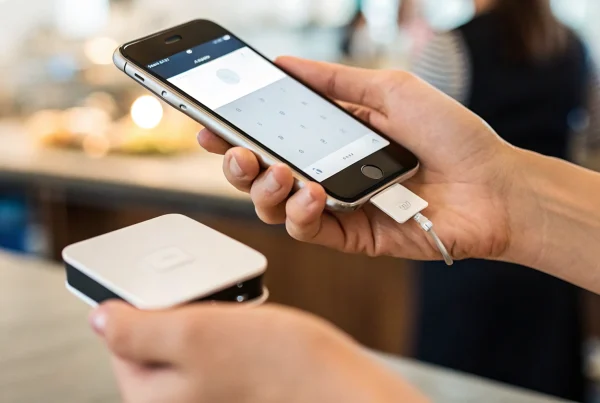
The foundation of accepting cardless payments in-store is a contactless system. This usually involves a point-of-sale (POS) terminal equipped with Near Field Communication (NFC) technology—the same tech that powers tap-to-pay. When a customer holds their smartphone or smartwatch near your reader, the NFC chip securely transmits their payment information to complete the sale in seconds. This method is not only fast but also highly secure, as the transaction data is encrypted. Upgrading your hardware is the first practical step to accept mobile payments and show customers you value their time and security.
Integrate Digital Payment Options
A new payment terminal shouldn’t create more work for you. The best systems are designed to fit perfectly into your existing workflow. Modern payment solutions seamlessly integrate with the tools you already use, including your POS software, e-commerce store, and accounting programs. This ensures that every transaction—whether it’s from a tapped phone in-store or a digital wallet online—is tracked consistently. A cohesive system prevents accounting headaches, simplifies inventory management, and gives you a clear, unified view of your sales data without any manual effort.
Improve the Customer Experience
Offering cardless payments is a direct response to changing customer behavior. Many shoppers, particularly younger ones, no longer carry cash and sometimes don’t even have their physical cards on them. By offering the digital payment options they prefer, you eliminate a potential barrier to purchase. A quick and effortless checkout process enhances the overall shopping experience, leaving customers with a positive impression of your brand. This small convenience can be a deciding factor that encourages repeat business and builds lasting loyalty.
Understanding the Costs for Your Business
Adopting new technology naturally comes with questions about cost. While there may be an initial investment in hardware or software, the right payment partner will provide transparent pricing without hidden fees. Look for a provider that offers effective and secure payment gateways with the flexibility to match your specific business needs. Whether you’re processing credit and debit cards, running an e-commerce site, or managing a gift card program, the goal is to find an affordable solution that supports your growth and makes payment processing a simple, predictable part of your budget.
Related Articles
- 5 Ways to Accept Credit Card Payments Without a Machine
- How to Accept Credit Card Payments Online for Free
- 5 Cheapest Ways to Accept Credit Card Payments Online
Frequently Asked Questions
What’s the real difference between a digital wallet and a virtual card? Think of it this way: a digital wallet stores a digital copy of your existing physical cards on your phone for convenient in-person tapping. A virtual card, on the other hand, creates a brand new, temporary card number that you use for online shopping. The wallet is for replacing your physical wallet in stores, while the virtual card is for protecting your real card information from online merchants.
Is it more expensive for a business to accept a mobile payment than a regular card swipe? Generally, no. The processing fees for a tap-to-pay transaction from a digital wallet are usually the same as they would be if the customer used their physical plastic card. The cost is tied to the type of card and your agreement with your payment processor, not whether the payment came from a phone or a physical card.
If my phone is lost or stolen, is my money safe? Yes, your financial information is very secure. Your digital wallet is protected by your phone’s passcode and requires your unique fingerprint or facial scan to approve any purchase. A thief can’t just pick up your phone and start spending. This multi-layered security makes losing your phone far less risky than losing your actual wallet.
Do I need special equipment to start accepting cardless payments at my business? All you need is a modern payment terminal that is equipped for contactless payments. Most payment readers sold today already have this Near Field Communication (NFC) technology built right in, so you just need to look for the contactless symbol. If your current hardware is a bit older, you may need a simple upgrade, but your payment provider can help you get set up quickly.
Which cardless method is best if I’m worried about security? Both digital wallets and virtual cards offer fantastic security, but they excel in different situations. For online shopping, especially with a new retailer, a virtual card is your strongest defense because it completely shields your real card number. For everyday in-store purchases, a digital wallet is extremely secure because it uses tokenization to create a one-time code and requires your biometric approval for every transaction.